> ## Documentation Index
> Fetch the complete documentation index at: https://docs-staging-automated-sdk-version-update.mintlify.site/llms.txt
> Use this file to discover all available pages before exploring further.

> 外部 API やサービスへの HTTP リクエストを認可するための、HTTP Vault 接続の設定方法を学びます。

# HTTP Vault 接続

<h2 id="configure-your-http-vault-connection-options">
  HTTP Vault 接続オプションを設定する
</h2>

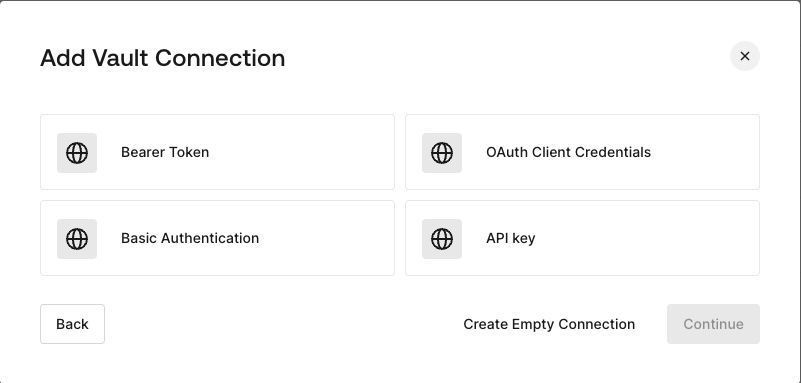
HTTP Vault 接続ではさまざまな認証オプションを設定でき、HTTP Request フローの Actions で利用できます。
<Frame>
  <img src="https://mintcdn.com/docs-staging-automated-sdk-version-update/3OOEiLs40J7M6lbV/docs/images/customize/forms/vaults/http-vault-connection-options.png?fit=max&auto=format&n=3OOEiLs40J7M6lbV&q=85&s=8930bab958a0b052627317fc4e892cc7" alt="Auth0 Dashboard > Actions > フォーム > Vault > HTTP" data-og-width="801" width="801" data-og-height="383" height="383" data-path="docs/images/customize/forms/vaults/http-vault-connection-options.png" data-optimize="true" data-opv="3" srcset="https://mintcdn.com/docs-staging-automated-sdk-version-update/3OOEiLs40J7M6lbV/docs/images/customize/forms/vaults/http-vault-connection-options.png?w=280&fit=max&auto=format&n=3OOEiLs40J7M6lbV&q=85&s=cc71e57013eb7f2b477fd53222c5d07a 280w, https://mintcdn.com/docs-staging-automated-sdk-version-update/3OOEiLs40J7M6lbV/docs/images/customize/forms/vaults/http-vault-connection-options.png?w=560&fit=max&auto=format&n=3OOEiLs40J7M6lbV&q=85&s=ef747af0898e6fbbd5accc125695070a 560w, https://mintcdn.com/docs-staging-automated-sdk-version-update/3OOEiLs40J7M6lbV/docs/images/customize/forms/vaults/http-vault-connection-options.png?w=840&fit=max&auto=format&n=3OOEiLs40J7M6lbV&q=85&s=1b3081379e79449d10ef1e8cb9e69e73 840w, https://mintcdn.com/docs-staging-automated-sdk-version-update/3OOEiLs40J7M6lbV/docs/images/customize/forms/vaults/http-vault-connection-options.png?w=1100&fit=max&auto=format&n=3OOEiLs40J7M6lbV&q=85&s=a45dc3f2bee85b0c693ce159db000f73 1100w, https://mintcdn.com/docs-staging-automated-sdk-version-update/3OOEiLs40J7M6lbV/docs/images/customize/forms/vaults/http-vault-connection-options.png?w=1650&fit=max&auto=format&n=3OOEiLs40J7M6lbV&q=85&s=e8f21f2b737019b6e7bddcc0b353fe95 1650w, https://mintcdn.com/docs-staging-automated-sdk-version-update/3OOEiLs40J7M6lbV/docs/images/customize/forms/vaults/http-vault-connection-options.png?w=2500&fit=max&auto=format&n=3OOEiLs40J7M6lbV&q=85&s=86d0b2d5e4890872a9fdd52c7714c369 2500w" />
</Frame>

<h2 id="configure-your-http-vault-connection-for-bearer-token">
  Bearer Token 用の HTTP Vault 接続を設定する
</h2>

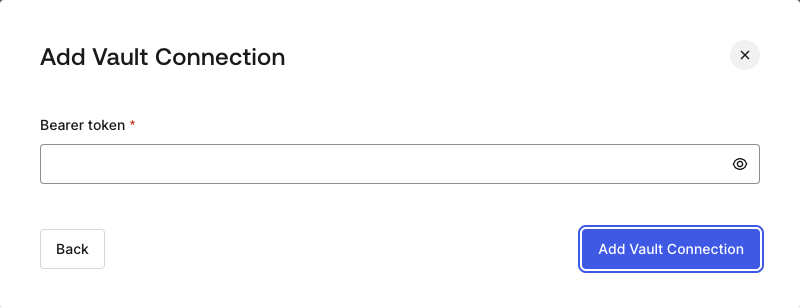
**Bearer Token** 認証を使用する HTTP Vault 接続を設定するには、必要なパラメーターを設定します。
<Frame>
  <img src="https://mintcdn.com/docs-staging-automated-sdk-version-update/3OOEiLs40J7M6lbV/docs/images/customize/forms/vaults/http-vault-connection-bearer-token.png?fit=max&auto=format&n=3OOEiLs40J7M6lbV&q=85&s=c77399259466fd2bf80011eb79a0cced" alt="Auth0 Dashboard > Actions > フォーム > Vault > HTTP" data-og-width="800" width="800" data-og-height="307" height="307" data-path="docs/images/customize/forms/vaults/http-vault-connection-bearer-token.png" data-optimize="true" data-opv="3" srcset="https://mintcdn.com/docs-staging-automated-sdk-version-update/3OOEiLs40J7M6lbV/docs/images/customize/forms/vaults/http-vault-connection-bearer-token.png?w=280&fit=max&auto=format&n=3OOEiLs40J7M6lbV&q=85&s=032f6004fa93dee9c46484f0fd77dc7c 280w, https://mintcdn.com/docs-staging-automated-sdk-version-update/3OOEiLs40J7M6lbV/docs/images/customize/forms/vaults/http-vault-connection-bearer-token.png?w=560&fit=max&auto=format&n=3OOEiLs40J7M6lbV&q=85&s=3a4bfff5a13840f94573aee1a4d189d8 560w, https://mintcdn.com/docs-staging-automated-sdk-version-update/3OOEiLs40J7M6lbV/docs/images/customize/forms/vaults/http-vault-connection-bearer-token.png?w=840&fit=max&auto=format&n=3OOEiLs40J7M6lbV&q=85&s=1a4bcda226a649bef0d31cbc2f454633 840w, https://mintcdn.com/docs-staging-automated-sdk-version-update/3OOEiLs40J7M6lbV/docs/images/customize/forms/vaults/http-vault-connection-bearer-token.png?w=1100&fit=max&auto=format&n=3OOEiLs40J7M6lbV&q=85&s=fa0e23c33545314341d6207ecbc02305 1100w, https://mintcdn.com/docs-staging-automated-sdk-version-update/3OOEiLs40J7M6lbV/docs/images/customize/forms/vaults/http-vault-connection-bearer-token.png?w=1650&fit=max&auto=format&n=3OOEiLs40J7M6lbV&q=85&s=7cf6c8c9eb615e5f4fe43ebba36eea84 1650w, https://mintcdn.com/docs-staging-automated-sdk-version-update/3OOEiLs40J7M6lbV/docs/images/customize/forms/vaults/http-vault-connection-bearer-token.png?w=2500&fit=max&auto=format&n=3OOEiLs40J7M6lbV&q=85&s=2e89dec5d32568da5ff0cd06d860159d 2500w" />
</Frame>

<h3 id="input-settings">
  入力設定
</h3>

| 項目           | 説明                    |
| ------------ | --------------------- |
| Bearer Token | 外部サービスの認可に使用する固定トークン。 |

<h2 id="configure-your-http-vault-connection-for-oauth-client-credentials">
  OAuth Client Credentials 向けに HTTP Vault 接続を設定する
</h2>

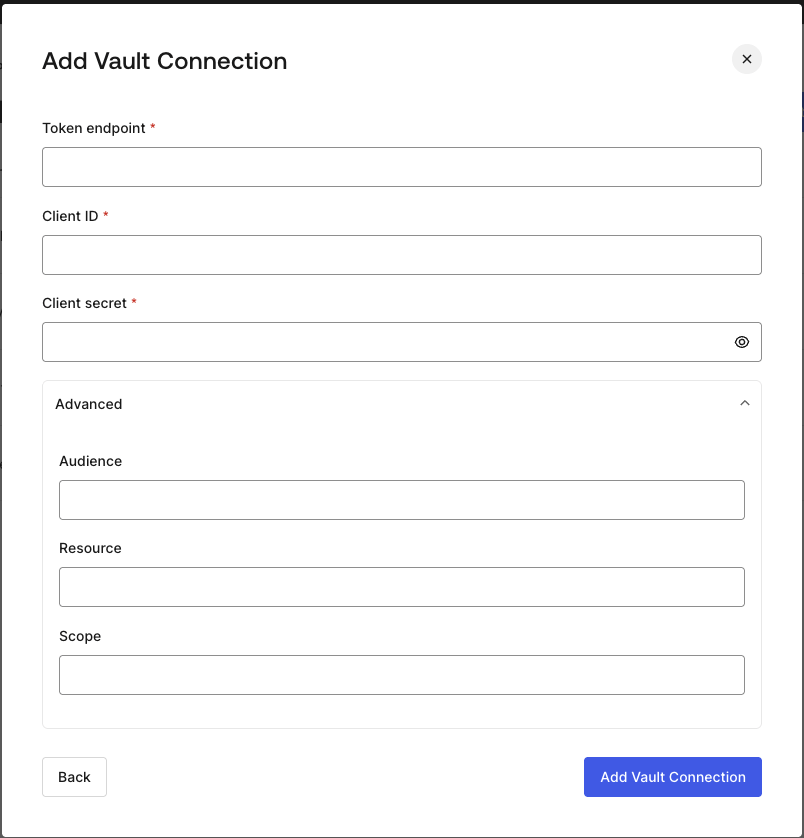
**Client Credentials** 認証を使用して HTTP Vault 接続を設定するには、必要なパラメーターを指定します。
<Frame>
  <img src="https://mintcdn.com/docs-staging-automated-sdk-version-update/3OOEiLs40J7M6lbV/docs/images/customize/forms/vaults/http-vault-connection-oauth-client-credentials.png?fit=max&auto=format&n=3OOEiLs40J7M6lbV&q=85&s=14358f821784bd368459c563f496651e" alt="Auth0 Dashboard > Actions > フォーム > Vault > HTTP " data-og-width="804" width="804" data-og-height="838" height="838" data-path="docs/images/customize/forms/vaults/http-vault-connection-oauth-client-credentials.png" data-optimize="true" data-opv="3" srcset="https://mintcdn.com/docs-staging-automated-sdk-version-update/3OOEiLs40J7M6lbV/docs/images/customize/forms/vaults/http-vault-connection-oauth-client-credentials.png?w=280&fit=max&auto=format&n=3OOEiLs40J7M6lbV&q=85&s=d8a11ff3d4729044b01421759ab4f8e4 280w, https://mintcdn.com/docs-staging-automated-sdk-version-update/3OOEiLs40J7M6lbV/docs/images/customize/forms/vaults/http-vault-connection-oauth-client-credentials.png?w=560&fit=max&auto=format&n=3OOEiLs40J7M6lbV&q=85&s=eb63d53b7beab9e1909a981ee2fca44b 560w, https://mintcdn.com/docs-staging-automated-sdk-version-update/3OOEiLs40J7M6lbV/docs/images/customize/forms/vaults/http-vault-connection-oauth-client-credentials.png?w=840&fit=max&auto=format&n=3OOEiLs40J7M6lbV&q=85&s=ee62980a9310c7e03418a5dc774627d8 840w, https://mintcdn.com/docs-staging-automated-sdk-version-update/3OOEiLs40J7M6lbV/docs/images/customize/forms/vaults/http-vault-connection-oauth-client-credentials.png?w=1100&fit=max&auto=format&n=3OOEiLs40J7M6lbV&q=85&s=b9121b340350c5102953720e2858ca9c 1100w, https://mintcdn.com/docs-staging-automated-sdk-version-update/3OOEiLs40J7M6lbV/docs/images/customize/forms/vaults/http-vault-connection-oauth-client-credentials.png?w=1650&fit=max&auto=format&n=3OOEiLs40J7M6lbV&q=85&s=9684bfde3303234af1fdf6c56bbaf58f 1650w, https://mintcdn.com/docs-staging-automated-sdk-version-update/3OOEiLs40J7M6lbV/docs/images/customize/forms/vaults/http-vault-connection-oauth-client-credentials.png?w=2500&fit=max&auto=format&n=3OOEiLs40J7M6lbV&q=85&s=118eb86ca91b0ed3c8b97b0473867a9f 2500w" />
</Frame>

<h3 id="input-settings-2">
  入力設定
</h3>

| Parameter           | Description                                         |
| ------------------- | --------------------------------------------------- |
| Tenant Endpoint     | アクセストークンを発行する認可サーバーの Tenant Endpoint。               |
| Client ID           | カスタム API へのアクセスを認可された M2M アプリケーションの Client ID。      |
| Client Secret       | カスタム API へのアクセスを認可された M2M アプリケーションの Client Secret。  |
| Audience (Optional) | カスタム API の audience。通常は Auth0 で定義したカスタム API で使用します。 |
| Resource (Optional) | カスタム API の Resource。audience とほぼ同じ意味を持つ標準パラメーターです。  |
| Scope (Optional)    | スペース区切りの文字列形式で指定するスコープのリスト。                         |

<h2 id="configure-your-http-vault-connection-for-api-key">
  API Key 用の HTTP Vault 接続を設定する
</h2>

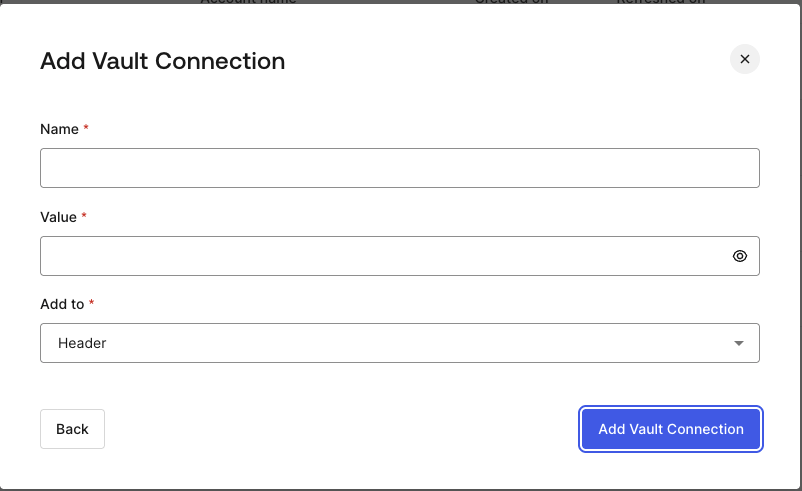
**API Key** 認証を使用して HTTP Vault 接続を設定するには、必要なパラメーターを指定します。
<Frame>
  <img src="https://mintcdn.com/docs-staging-automated-sdk-version-update/3OOEiLs40J7M6lbV/docs/images/customize/forms/vaults/http-vault-connection-api-key.png?fit=max&auto=format&n=3OOEiLs40J7M6lbV&q=85&s=1b9a73eebc97f48f3bb7b831cfb93c98" alt="Auth0 Dashboard > Actions > フォーム > Vault > HTTP " data-og-width="802" width="802" data-og-height="491" height="491" data-path="docs/images/customize/forms/vaults/http-vault-connection-api-key.png" data-optimize="true" data-opv="3" srcset="https://mintcdn.com/docs-staging-automated-sdk-version-update/3OOEiLs40J7M6lbV/docs/images/customize/forms/vaults/http-vault-connection-api-key.png?w=280&fit=max&auto=format&n=3OOEiLs40J7M6lbV&q=85&s=e18872aadbcd60caca302ad4f2816af1 280w, https://mintcdn.com/docs-staging-automated-sdk-version-update/3OOEiLs40J7M6lbV/docs/images/customize/forms/vaults/http-vault-connection-api-key.png?w=560&fit=max&auto=format&n=3OOEiLs40J7M6lbV&q=85&s=8a485603c9fa158a207e7161460448ce 560w, https://mintcdn.com/docs-staging-automated-sdk-version-update/3OOEiLs40J7M6lbV/docs/images/customize/forms/vaults/http-vault-connection-api-key.png?w=840&fit=max&auto=format&n=3OOEiLs40J7M6lbV&q=85&s=0cce493b5658b22043ef0d93bcb678ae 840w, https://mintcdn.com/docs-staging-automated-sdk-version-update/3OOEiLs40J7M6lbV/docs/images/customize/forms/vaults/http-vault-connection-api-key.png?w=1100&fit=max&auto=format&n=3OOEiLs40J7M6lbV&q=85&s=cabc4ab5ae1da62266ba88546015b3ff 1100w, https://mintcdn.com/docs-staging-automated-sdk-version-update/3OOEiLs40J7M6lbV/docs/images/customize/forms/vaults/http-vault-connection-api-key.png?w=1650&fit=max&auto=format&n=3OOEiLs40J7M6lbV&q=85&s=c27a4871e8ef0a2669d527554a95a186 1650w, https://mintcdn.com/docs-staging-automated-sdk-version-update/3OOEiLs40J7M6lbV/docs/images/customize/forms/vaults/http-vault-connection-api-key.png?w=2500&fit=max&auto=format&n=3OOEiLs40J7M6lbV&q=85&s=57fa7dd52396c3598786d2488fa85f4c 2500w" />
</Frame>

<h3 id="input-settings-3">
  入力設定
</h3>

| Parameter | Description                                                              |
| --------- | ------------------------------------------------------------------------ |
| Name      | Header またはクエリパラメータとして追加する API Key の名前。                                   |
| Value     | Header またはクエリパラメータとして追加する API Key の値。                                    |
| Add To    | デフォルトでは Header に追加されます。API Key を Header として追加するか、クエリパラメータとして追加するかを指定します。 |

<h2 id="configure-your-http-vault-connection-for-basic-authentication">
  Basic Authentication の HTTP Vault 接続を設定する
</h2>

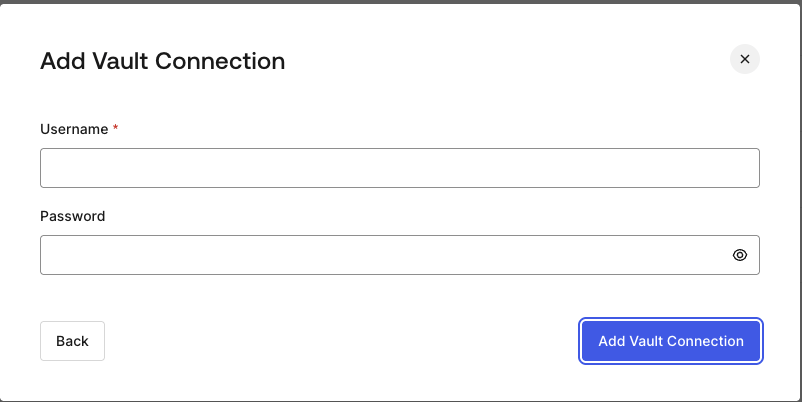
**Basic Auth** 認証を使用する HTTP Vault 接続を設定するには、必要なパラメーターを設定します。
<Frame>
  <img src="https://mintcdn.com/docs-staging-automated-sdk-version-update/3OOEiLs40J7M6lbV/docs/images/customize/forms/vaults/http-vault-connection-basic-authentication.png?fit=max&auto=format&n=3OOEiLs40J7M6lbV&q=85&s=419a069563cd3ed847284f7090959ae0" alt="Auth0 Dashboard > Actions > フォーム > Vault > HTTP " data-og-width="802" width="802" data-og-height="402" height="402" data-path="docs/images/customize/forms/vaults/http-vault-connection-basic-authentication.png" data-optimize="true" data-opv="3" srcset="https://mintcdn.com/docs-staging-automated-sdk-version-update/3OOEiLs40J7M6lbV/docs/images/customize/forms/vaults/http-vault-connection-basic-authentication.png?w=280&fit=max&auto=format&n=3OOEiLs40J7M6lbV&q=85&s=365cceb1311fd4f8752bcd698b417f4e 280w, https://mintcdn.com/docs-staging-automated-sdk-version-update/3OOEiLs40J7M6lbV/docs/images/customize/forms/vaults/http-vault-connection-basic-authentication.png?w=560&fit=max&auto=format&n=3OOEiLs40J7M6lbV&q=85&s=52518f557bf00f91dc48a08f6bfab791 560w, https://mintcdn.com/docs-staging-automated-sdk-version-update/3OOEiLs40J7M6lbV/docs/images/customize/forms/vaults/http-vault-connection-basic-authentication.png?w=840&fit=max&auto=format&n=3OOEiLs40J7M6lbV&q=85&s=c2b4c84f273108f0e6c83efa9f6770f7 840w, https://mintcdn.com/docs-staging-automated-sdk-version-update/3OOEiLs40J7M6lbV/docs/images/customize/forms/vaults/http-vault-connection-basic-authentication.png?w=1100&fit=max&auto=format&n=3OOEiLs40J7M6lbV&q=85&s=5560c1f1960d9c78e7c79d0cd45a29a1 1100w, https://mintcdn.com/docs-staging-automated-sdk-version-update/3OOEiLs40J7M6lbV/docs/images/customize/forms/vaults/http-vault-connection-basic-authentication.png?w=1650&fit=max&auto=format&n=3OOEiLs40J7M6lbV&q=85&s=93d1b2deac2b419050a9aba6eb7947f8 1650w, https://mintcdn.com/docs-staging-automated-sdk-version-update/3OOEiLs40J7M6lbV/docs/images/customize/forms/vaults/http-vault-connection-basic-authentication.png?w=2500&fit=max&auto=format&n=3OOEiLs40J7M6lbV&q=85&s=03eac9a78f50ff1e6eb315b4e6f7c24c 2500w" />
</Frame>

<h3 id="input-settings-4">
  入力設定
</h3>

| Parameter | Description                                                  |
| --------- | ------------------------------------------------------------ |
| ユーザー名     | 連結してBase64エンコードし、Basic Authorization ヘッダーパラメーターとして追加するユーザー名。 |
| パスワード     | 連結してBase64エンコードし、Basic Authorization ヘッダーパラメーターとして追加するパスワード。 |

<Warning>
  Basic Auth が設定された HTTP Vault 接続は、現在 Flows HTTP Request Action に組み込まれているオプションを将来的に置き換える予定です。
</Warning>
